
No inject. No game process.
ClawAim: a Windows YOLO aimbot that runs on your GPU.
Internals sit inside the game. ClawAim does not. It crops the screen and runs YOLO on your NVIDIA GPU: a Marvel Rivals aimbot, Warzone YOLO, Roblox ONNX, or any pack with a model. TensorRT .engine or ONNX. Windows only. Start free. Full access for 12 hours.
Free 12 hours
$0 · launch trial
Same features as paid. One 12-hour key per browser this week.
Not an injector
Internals load into the game. ClawAim never touches that process.
Not in memory
No reads, no writes, no kernel driver in the title. Screen crop only.
Local GPU
YOLO runs on your NVIDIA card. Tried on this loop. Not a cloud overlay.
See it in Action
ClawAim GPU Aimbot Gameplay
Local YOLO on your GPU. No injector, no game memory. Watch a full run with detection, lock, and aim in-game.
Not an internal. A screen crop.
The whole product is this loop on your PC: crop, detect, lock, move. Nothing is written into the game process. No cloud inference.
Capture
Center crop via BetterCam or MSS. Nothing injects into the game.
Detect
YOLO AI detection draws boxes on the crop. Load a .engine or a .onnx. Raw .pt is not used live.
FOV
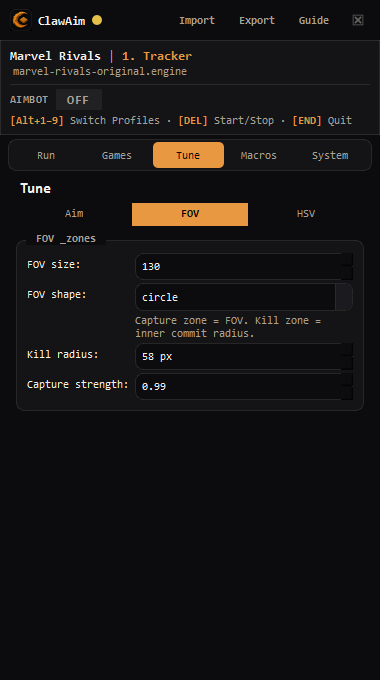
One target inside a circle or square. HSV and friend/foe if the model has it.
Mouse
Win32, GHUB, Arduino, spoofed Arduino, Makcu, or RP2040.
Features
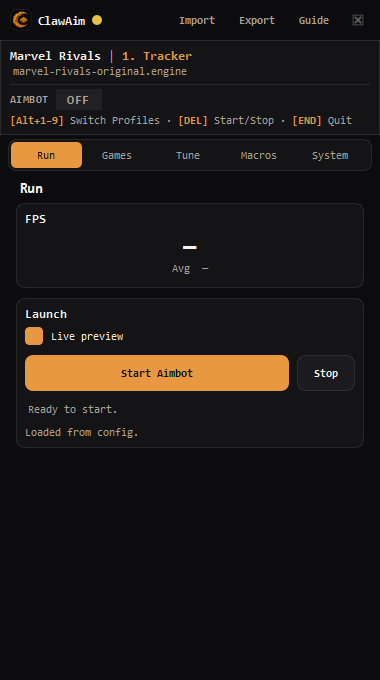
What ships in the app.
Same feature set on every plan. Duration is the only difference. Activate the key in the desktop app.
- 01
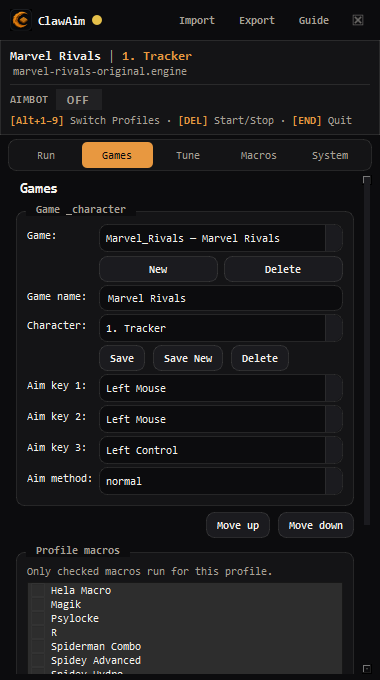
Game packs and profiles
YOLO file sits on the game. FOV, aim keys, smoothing, and macros sit on the character. Switch in-game with Alt+1 through Alt+9.
- 02
TensorRT or ONNX
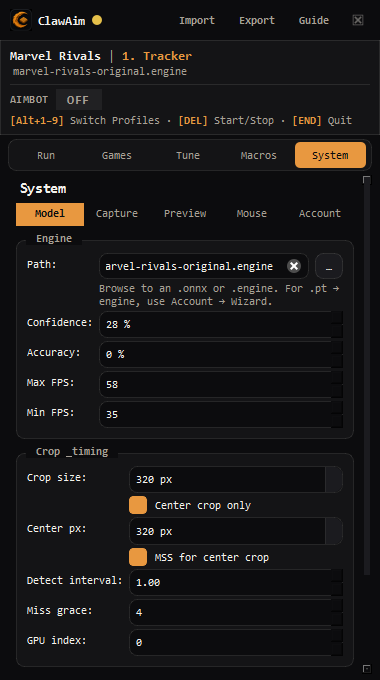
Per-game model path. Fastest is a TensorRT .engine on this GPU. Portable path is ONNX. Live inference never loads a raw .pt.
- 03
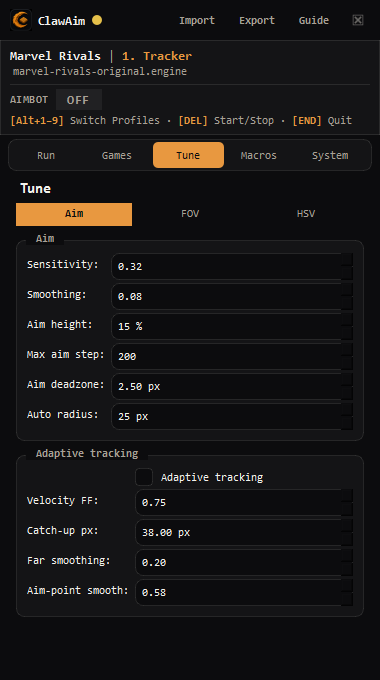
Aim, FOV, HSV
Sensitivity, smoothing, deadzone, adaptive tracking. Circle or square FOV with kill and capture zones. Optional HSV color gate.
- 04
Three aim methods
normal while the aim key is held. hold_release with optional wiggle. auto_trigger when the crosshair is inside the radius.
- 05
Mouse backends
Win32api, Logitech GHUB, Arduino, spoofed Arduino, Makcu, or RP2040. Serial protocol and COM port when you use a board.
- 06
Macros
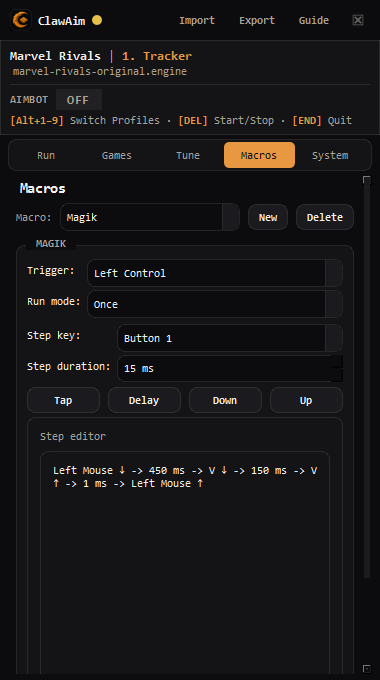
Shared library of taps, delays, and key down/up. Enable which macros run on each character. Triggers are keybinds only.
- 07
Live preview
Detection boxes, FOV outline, zone rings, class labels, HSV mask, and FPS while the loop is running.
- 08
Import and export
Share a character, a whole game, or the macro library. License keys, model paths, and COM ports stay off the file.
Game packs. Character profiles.
FOV, aim keys, smoothing, and macros sit on the character. The YOLO file sits on the game pack. Same aimbot loop for a Marvel Rivals aimbot, Warzone YOLO, Roblox ONNX, Valorant, Fortnite, CS2, or any other title with a model. Switch in-game with Alt+1 through Alt+9.
- Marvel Rivalsaimbot · yolo
- Warzoneaimbot · yolo
- Valorantaimbot · yolo
- Robloxaimbot · yolo
- Fortniteaimbot · yolo
- Apex Legendsaimbot · yolo
- CS2aimbot · yolo
- Rainbow Six Siegeaimbot · yolo
- Rustaimbot · yolo
- Overwatchaimbot · yolo
- The Finalsaimbot · yolo
- Arc Raidersaimbot · yolo
- Battlefieldaimbot · yolo
- PUBGaimbot · yolo
- Delta Forceaimbot · yolo
- Deadlockaimbot · yolo
- Bloodstrikeaimbot · yolo
YOLO AI detection. Two file types.
ClawAim does not inject. It crops the screen and runs a YOLO object detector so it can see players as boxes. That is the AI detection step. You pick one weights file per game pack: TensorRT .engine or ONNX .onnx. Live inference never loads a raw .pt. Setup.exe does not bundle models. Download .onnx and .pt from MossyModels, then import ONNX in Setup or export PT to an engine on this PC.
Download ONNX and PT on MossyModels.engine
TensorRT engine
Fastest path. Built for this NVIDIA GPU and this TensorRT version. Needs CUDA plus TensorRT (ClawRT). Cannot be copied blindly to another PC. If an engine and an ONNX exist, ClawAim prefers the engine.
.onnx
ONNX Runtime
Portable YOLO export. Import in Setup. Runs without TensorRT. Slower than an engine on the same card. Subscribers start here. The installer does not bundle models. You can build an engine from ONNX later if TensorRT is installed.
Which games use which file
Format is not locked to a title. Each game pack has its own model path. Either file works on any pack: Marvel Rivals YOLO, Warzone, Roblox ONNX, Valorant, Fortnite, CS2, Apex, and the rest. Example packs in this repo:
- Marvel Rivals
- Example pack points at a TensorRT .engine (YOLOv8 weights exported for this GPU). Friend/foe class models also live as engines or ONNX plus a .classes.json sidecar.
- Roblox
- ONNX works on this pack. Import a .onnx for the experience you play. No TensorRT required. Build an engine later on this GPU if you want more speed.
- COD / Warzone
- Example pack points at an .onnx (for example WZ_50k at 320). Use this when you want a file you can share or run before TensorRT is installed.
- Any other pack
- Default starts empty. Import ONNX for that game, or drop an engine. Switch games and import again if that game has no model yet.
Guide
What is a YOLO aimbot?
Screen crop, local GPU detection, mouse out. Not an injector, not a cloud overlay. TensorRT versus ONNX, setup order, and the mistakes that look like a bad model.
Read the guideAim methods and mouse out
Free 12 hours
Full ClawAim. Zero upfront.
Launch week: claim a 12-hour license key, activate in the desktop app. Same features as paid. One key per browser.
Start freePrefer instant access? Buy a key from $4.99